
 Mua mã giảm giá
 Code giảm giá web USA
 Code giảm giá web UK
 Code giảm giá web JP
 Mua tài khoản Checkout
 Nạp game & mua apps
 Nạp game Android
 Mua apps IOS
 Mua apps Android
 Mua phần mềm cho Windows
 Mua phần mềm cho Macbook
 Mua thẻ quà tặng/Gift card
 Mua tuts & tools Checkout
 Chia sẻ code
 Mua sản phẩm khác
 Trang chủ
 Giới thiệu
 Sản phẩm
 Tin tức
 Chia sẻ code
 Chính sách bảo hành
Hướng dẫn cài Magisk Manager Root dành cho giả lập android mới nhất
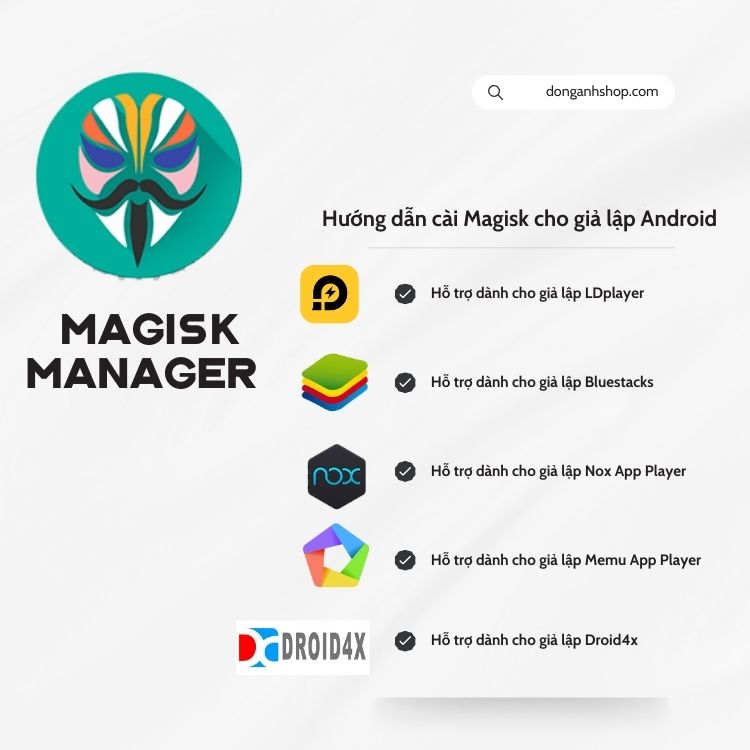
Root cho giả lập Android LDPlayer là gì?
Root trên Android LDPlayer, đề cập đến việc giành quyền truy cập cao nhất (quyền root) vào hệ thống. Quyền root cho phép người dùng can thiệp sâu vào các tệp hệ thống, thay đổi cấu hình mặc định, hoặc cài đặt những ứng dụng yêu cầu quyền truy cập đặc biệt. Trên các giả lập Android như BlueStacks, NoxPlayer, hoặc LDPlayer, root thường được sử dụng để kiểm tra ứng dụng, tinh chỉnh hệ thống, hoặc chạy các phần mềm chỉ hoạt động trên thiết bị đã root. Nhưng thường có một số phần mềm cần phần sụn đặc biệt Root cao cấp hơn. Việc phần mềm Root mặc định của các giả lập đều không đáp ứng được việc này. Và cũng như sử dụng tính năng ẩn Root thông thường là không thể.
Giả lập Android vốn được thiết kế để mô phỏng môi trường Android trên máy tính. Việc root giả lập khác với root trên thiết bị thật vì môi trường này không phải là phần cứng thực tế. Khi root giả lập, người dùng có thể kích hoạt quyền này dễ dàng hơn, thường chỉ cần vài bước hoặc sử dụng công cụ tích hợp sẵn của giả lập.
Một số lợi ích của việc root sâu giả lập Android bao gồm:
- Tự do tùy chỉnh: Bạn có thể thay đổi giao diện hoặc tối ưu hóa hệ thống theo ý muốn.
- Chạy ứng dụng đặc biệt: Các ứng dụng yêu cầu quyền root cao, như Xposed Framework hoặc Lucky Patcher, ẩn Root, có thể hoạt động.
- Kiểm tra và phát triển: Các nhà phát triển có thể thử nghiệm các tính năng đòi hỏi quyền truy cập hệ thống mà không làm hỏng thiết bị thật.
Cách cài đặt Magisk vào giả lập LDplayer như thế nào ?
Bước 1: Cài đặt giả lập chọn chế độ
– Cao cấp -> Ổ dùng chung-> System.vmdk ghi được
– Khác -> Quyền Root -> Bật.
Bước 2: Mở giả lập LDPlayer lên. Cài app Magisk-Delta-v26.4-Mod-by[donganhshop.com].apk và Root Explorer.apk
Link tải app để ngay bên dưới bài viết.
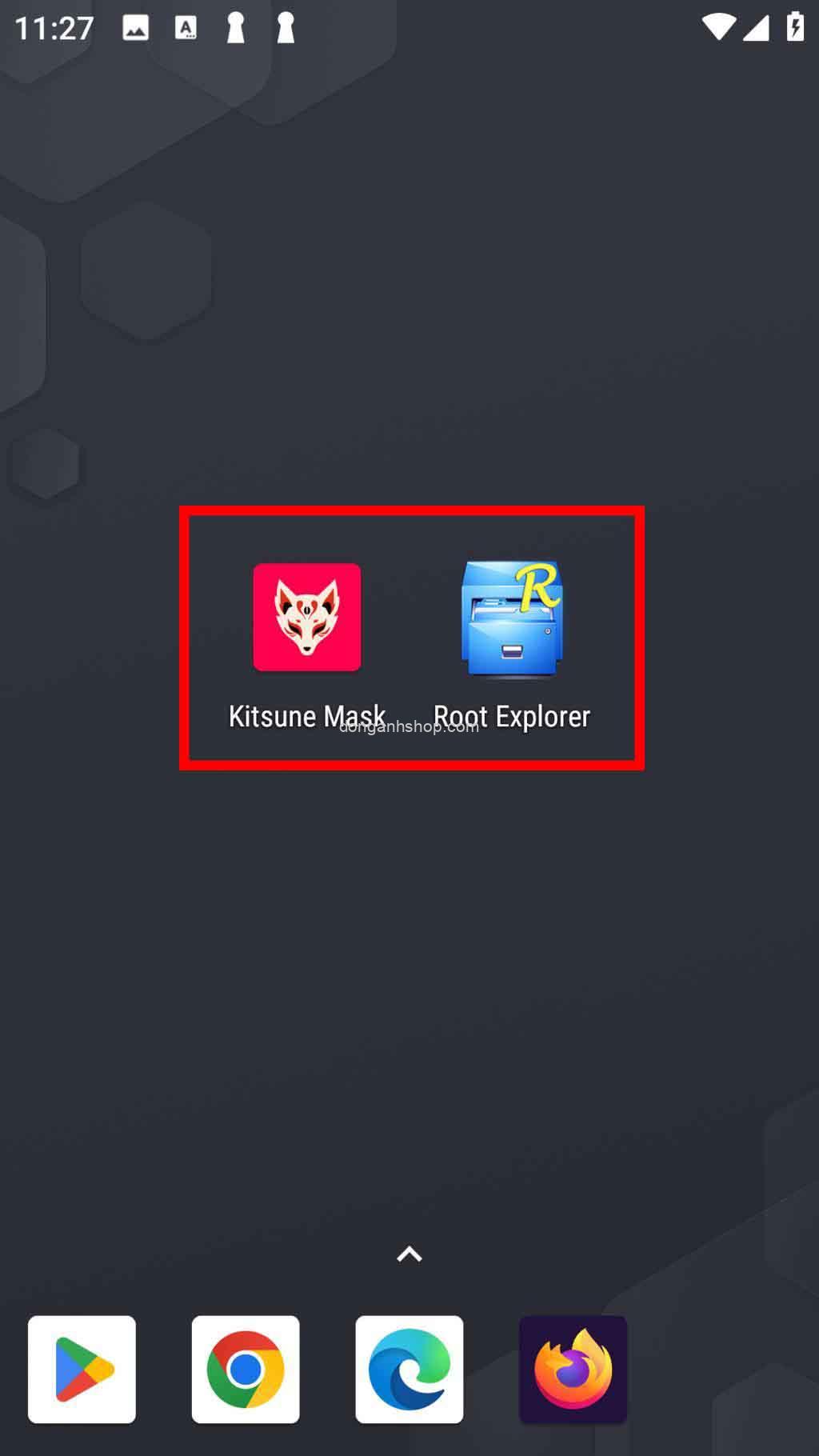
1. Sau khi cài đặt xong Magisk Delta, mở app Magisk lên. Vào mục Magisk -> Cài đặt.
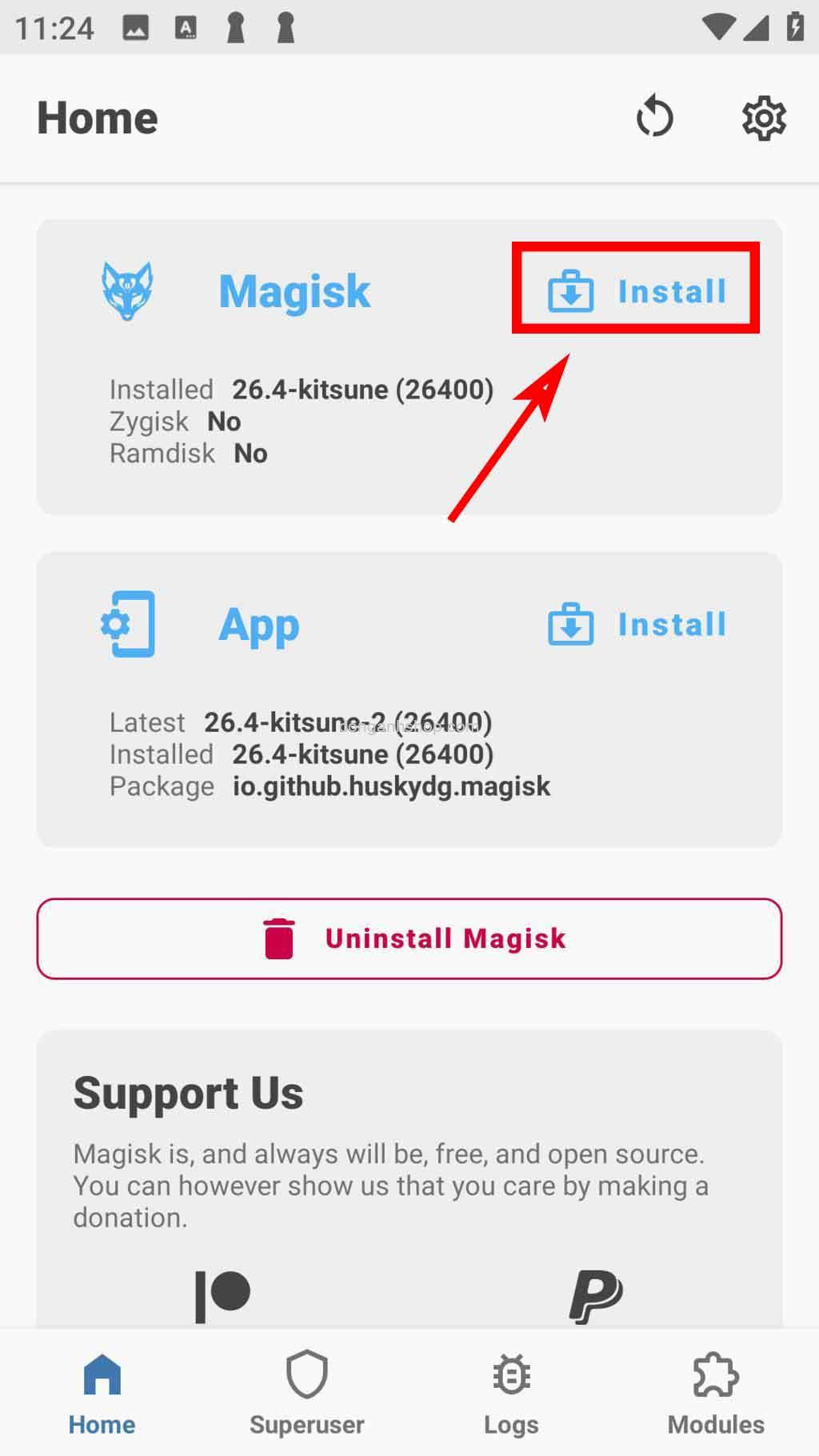
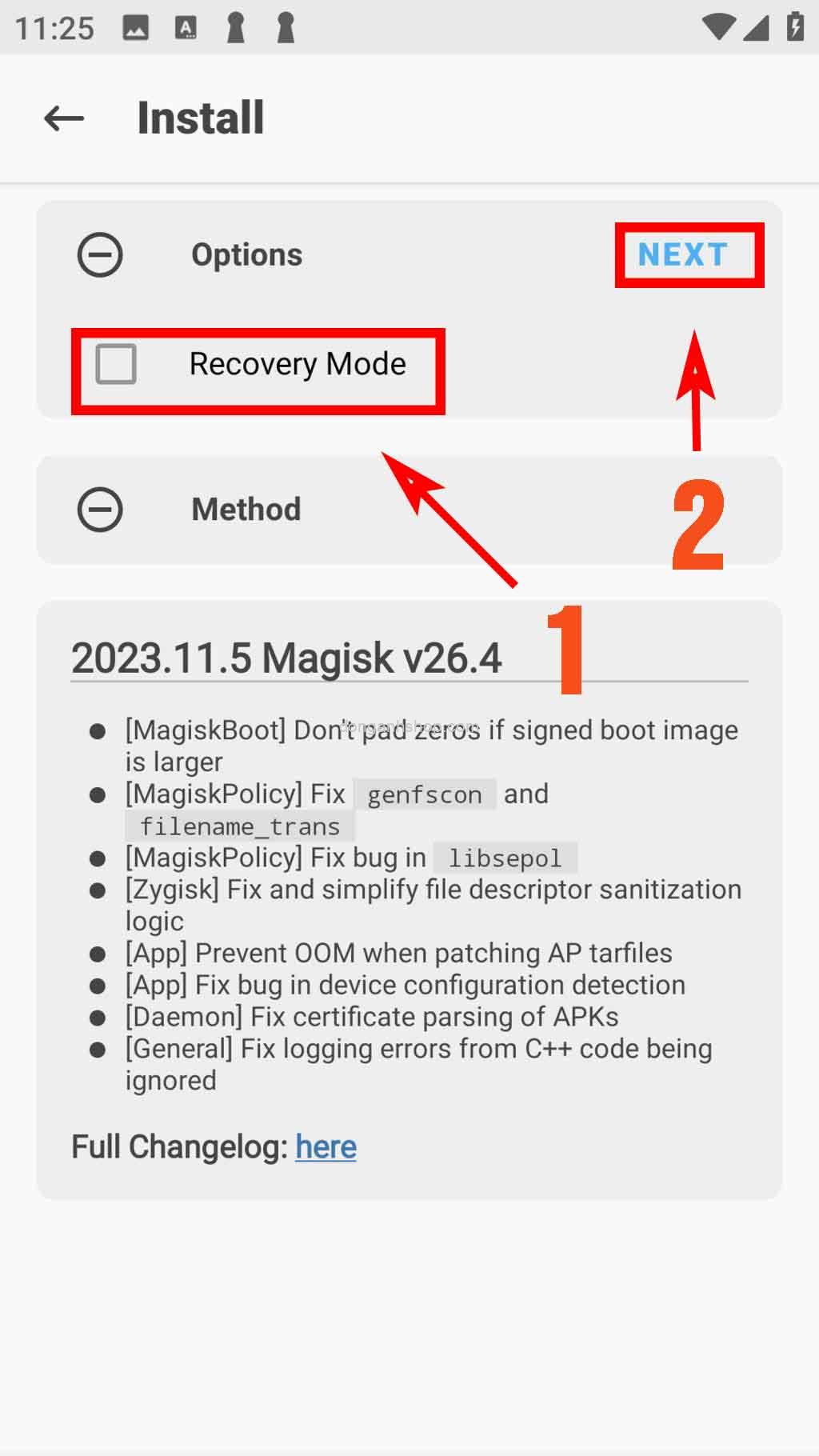
2. Click chuột bỏ “Chế độ Recovery” -> Kế tiếp.
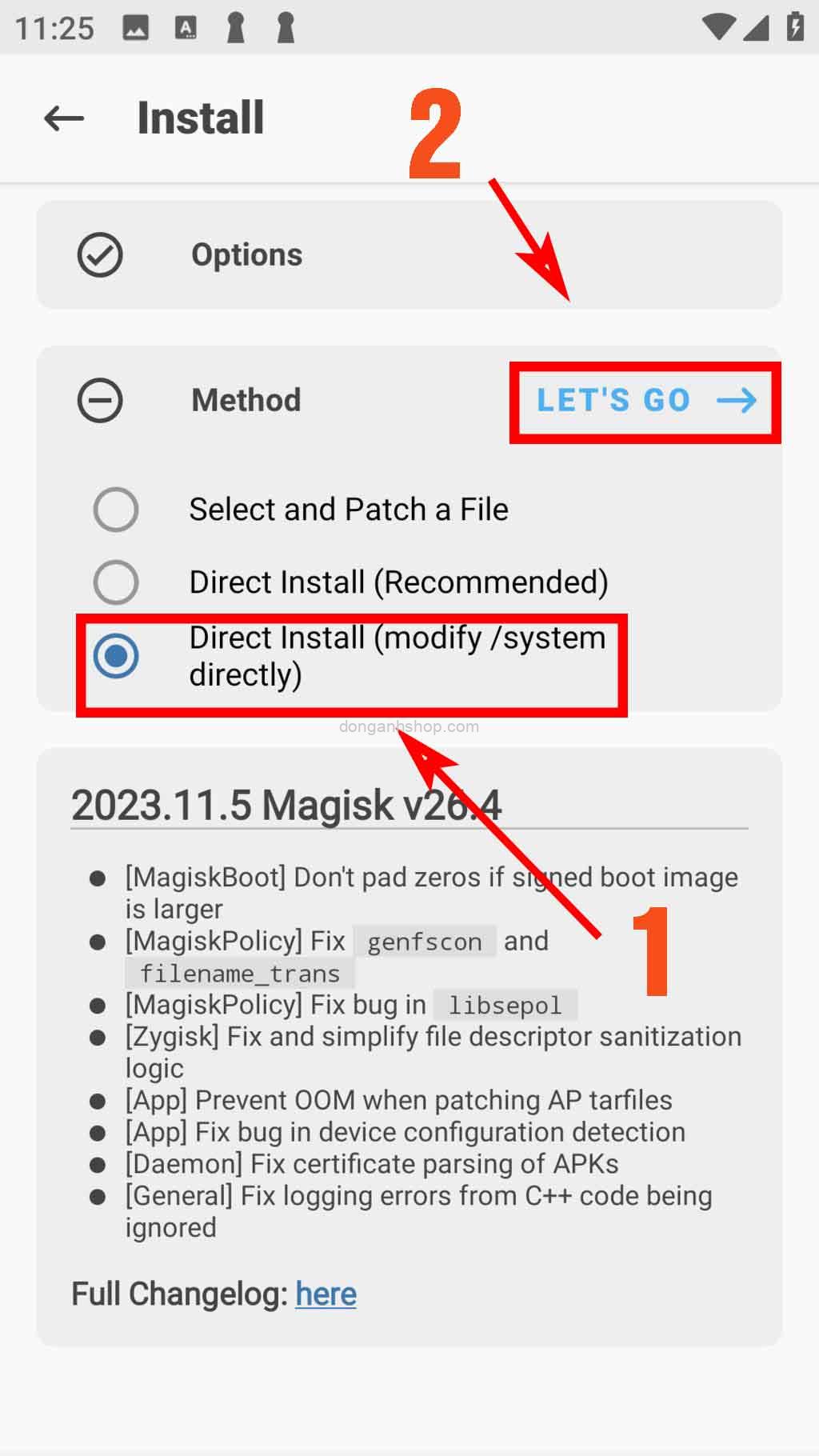
3. Chọn dòng Cài đặt trược tiếp (sửa đổi /system trực tiếp) -> Đi nào.
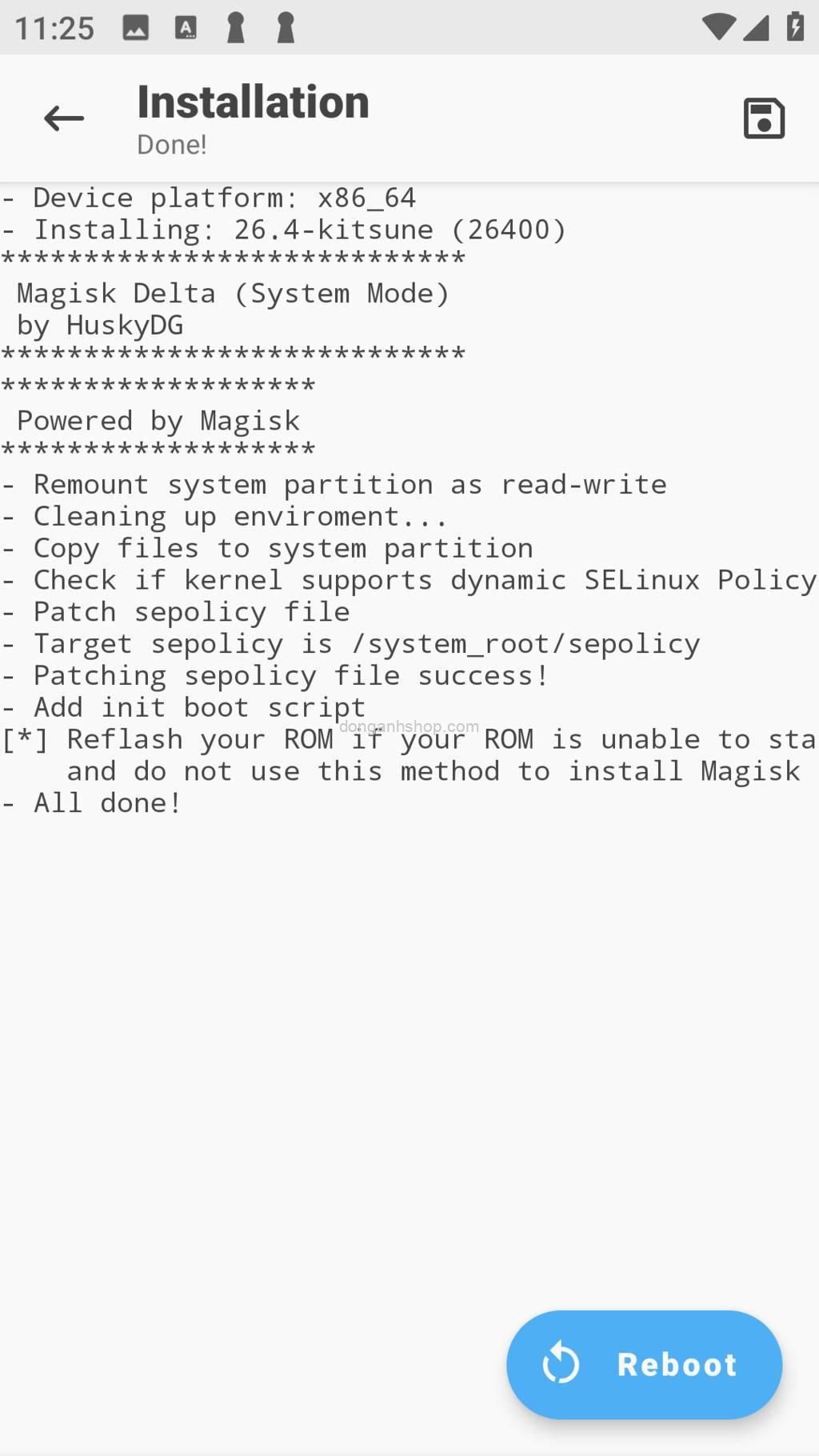
4. Sau khi chạy xong như hình dưới. Thì thoát app Magisk Delta ra. Nghiêm cấm không được bấm vào nút “Khởi động lại”
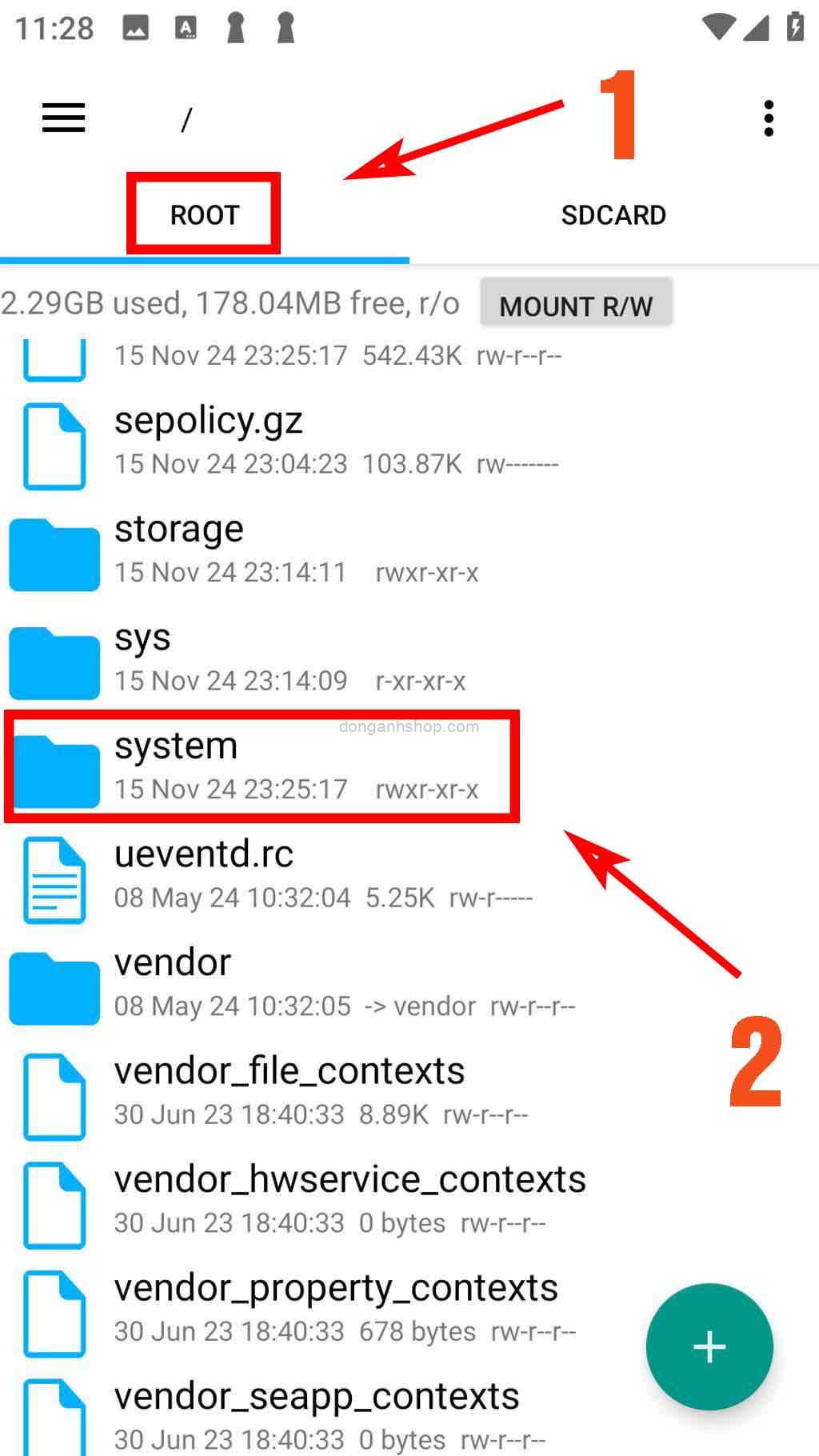
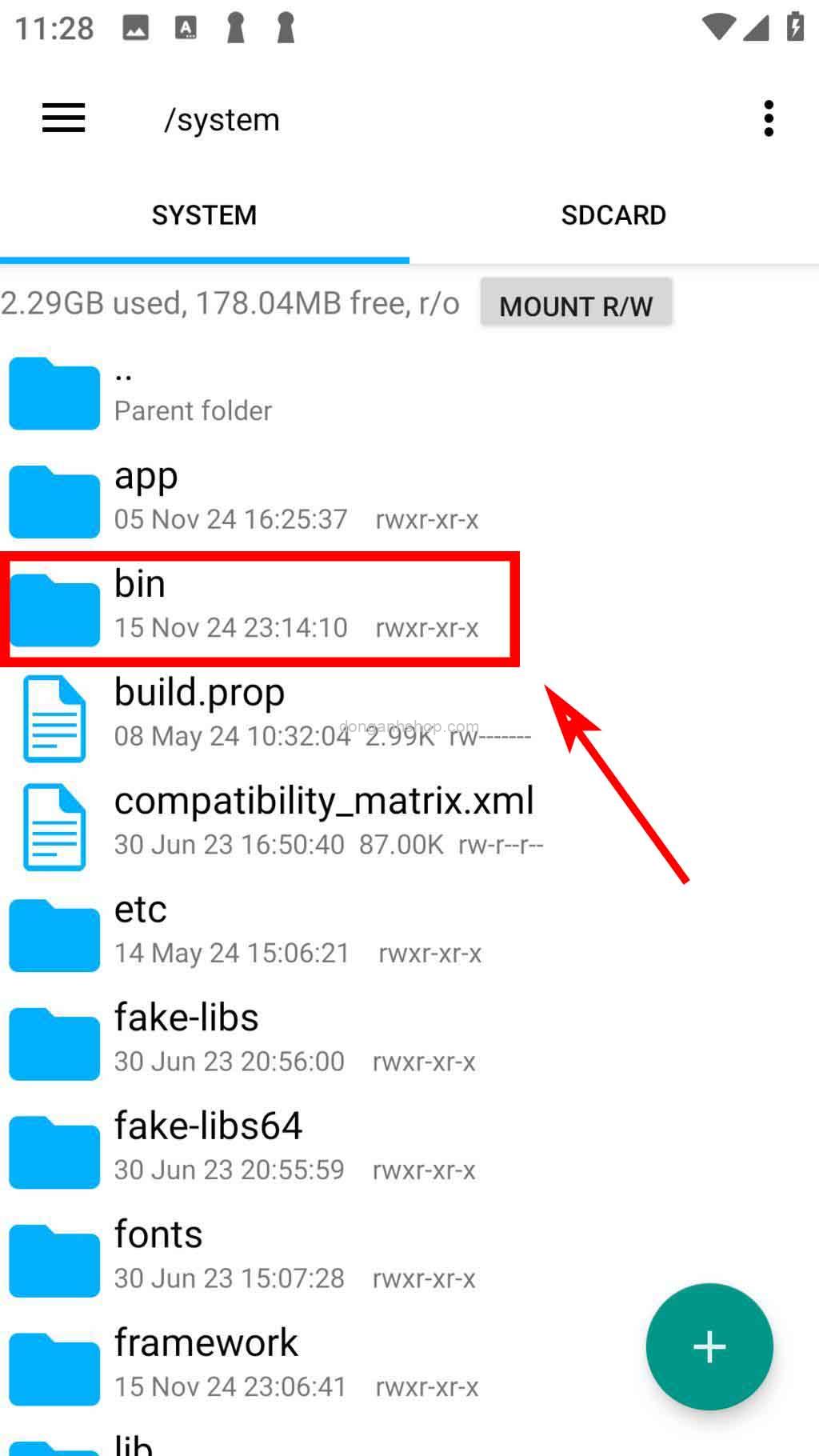
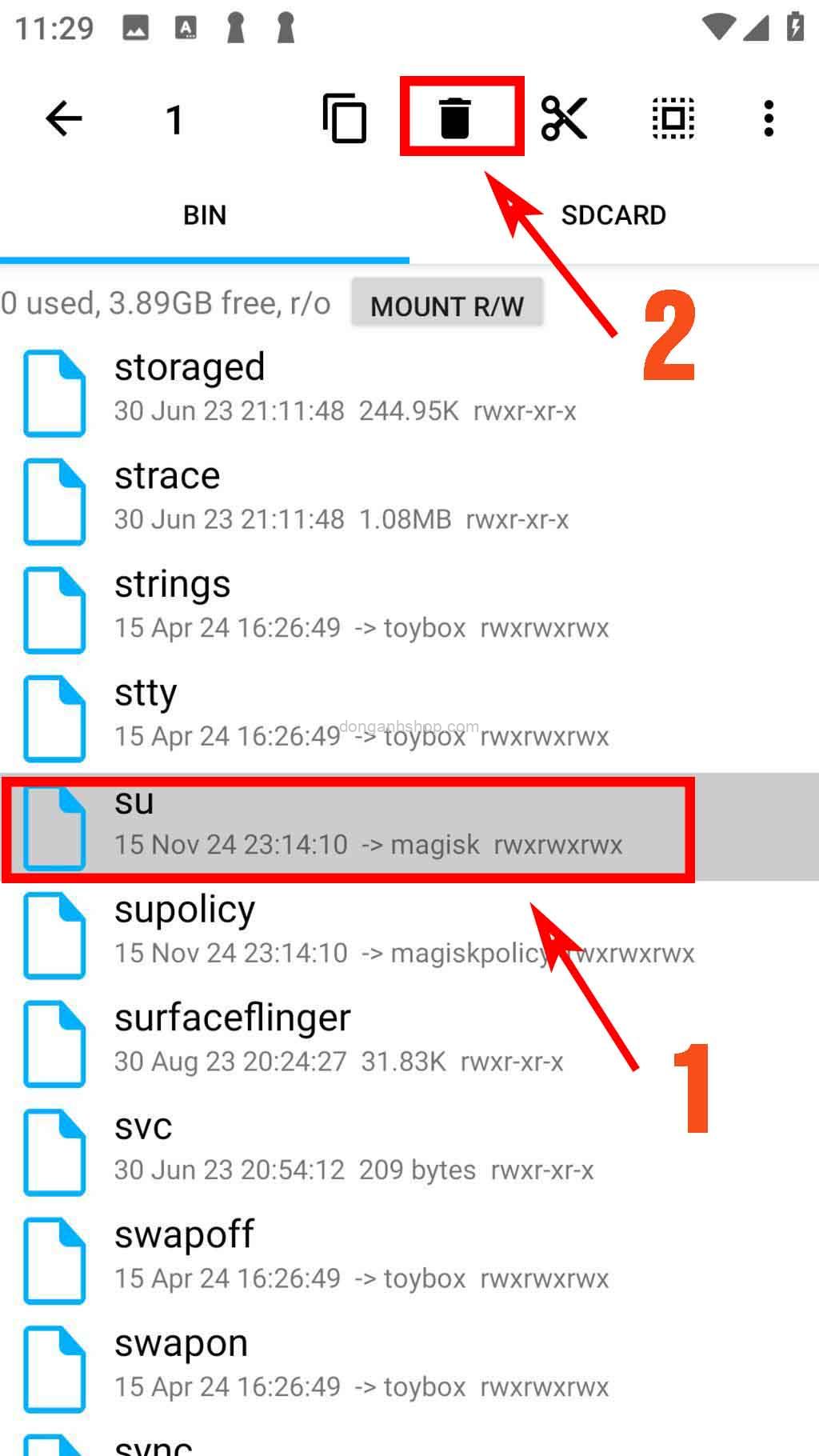
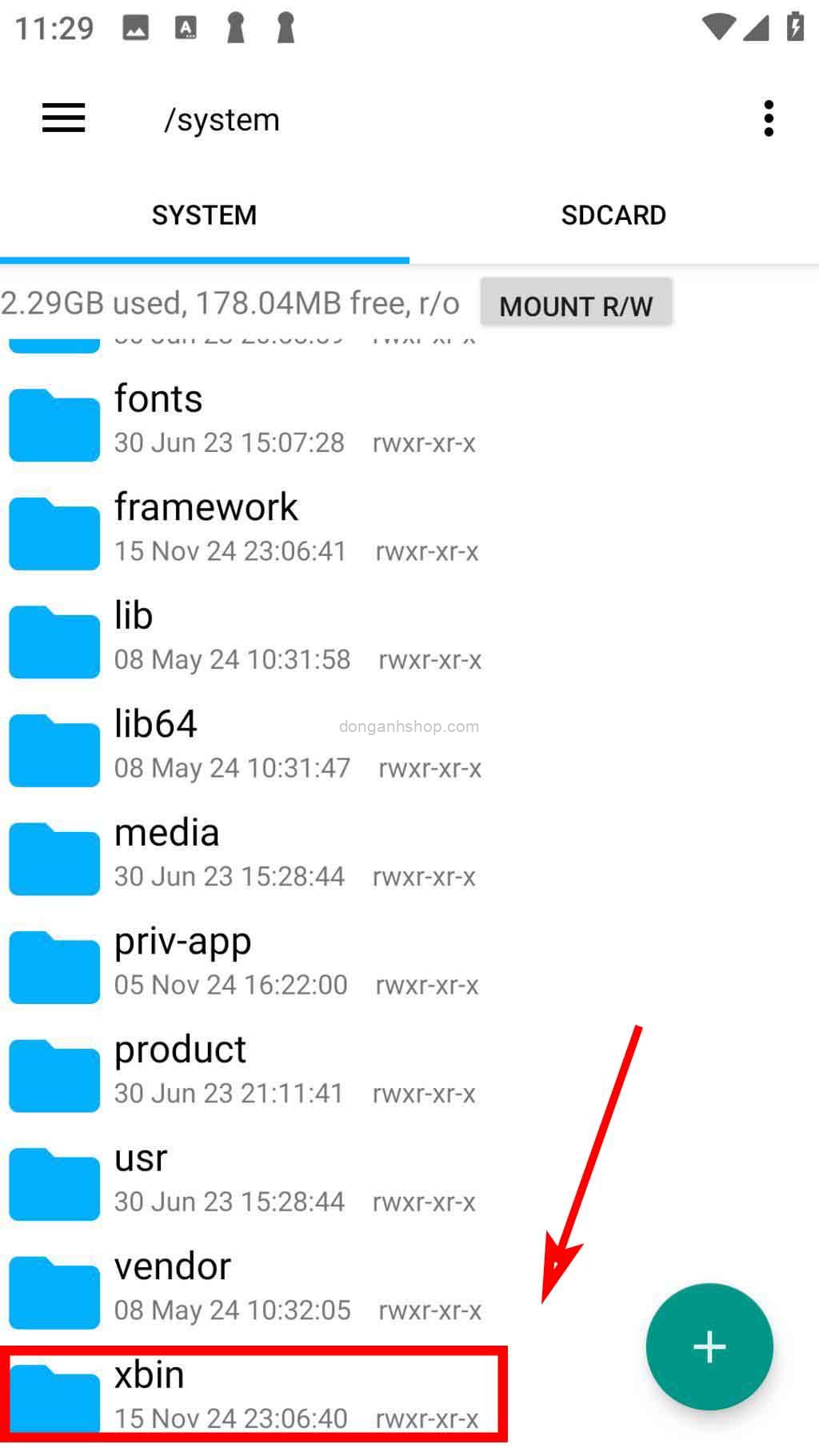
Bước 3: Mở app Root Explorer lên, chọn mục ROOT -> tìm đến thư mục System để xoá 2 file su
– System/bin – tìm và xoá file su
– System/xbin – tìm và xoá file su
Bước 4: Tắt hẳn LDplayer hoặc khởi động lại LDplayer. Vậy là đã cài thành công Magisk Delta Root cho giả lập Android LDplayer.
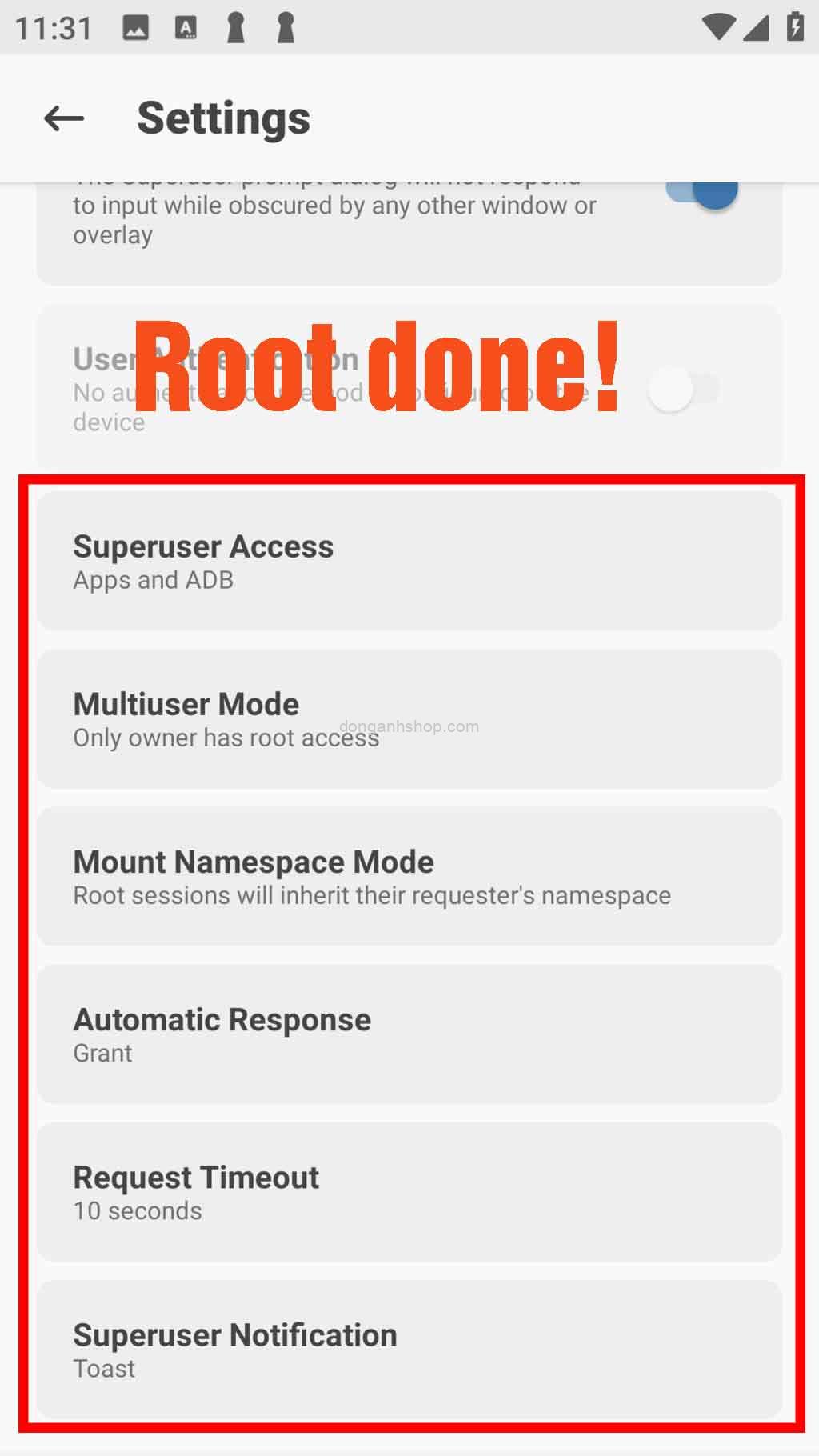
Chúc các bạn thành công!
Mọi thắc mắc hay vấn đề cần giải đáp, xin vui lòng để lại comment, bình luận bên dưới để được trợ giúp. Xin cảm ơn!
**What is Root for LDPlayer Android Emulator?**
Root on LDPlayer refers to gaining the highest level of system access (root privileges). Root access allows users to deeply modify system files, change default configurations, or install applications requiring special permissions. On Android emulators like BlueStacks, NoxPlayer, or LDPlayer, root is often used to test applications, tweak the system, or run software that only functions on rooted devices. However, certain advanced software requires higher-level root firmware, which the default root features of these emulators cannot fulfill. Additionally, using conventional hidden root methods is often ineffective.
Android emulators are designed to simulate an Android environment on a PC. Rooting an emulator differs from rooting a physical device because the emulator operates in a virtual, non-hardware environment. Rooting the emulator is typically easier and often involves just a few steps or utilizing built-in tools.
Some benefits of advanced rooting on Android emulators include:
– **Customization Freedom:** Modify the interface or optimize the system to your liking.
– **Run Special Applications:** Applications requiring high-level root access, such as Xposed Framework or Lucky Patcher with hidden root, can function properly.
– **Testing and Development:** Developers can experiment with system-level features without risking damage to actual devices.
### How to Install Magisk on LDPlayer Emulator
#### Step 1: Configure the Emulator
– Go to settings and select:
– **Advanced → Shared Disk → Writable System.vmdk**
– **Others → Root Access → Enable.**
#### Step 2: Install Magisk
1. Launch LDPlayer and install the app `Magisk-Delta-v26.4-Mod-by[donganhshop.com].apk`.
– **Download links:** [Server 1], [Server 2]
2. After installing Magisk Delta, open the app. Navigate to **Magisk → Install**, and:
– Uncheck “Recovery Mode.”
– Select “Direct Install (modify /system directly)” and click **Go**.
– Once completed (as shown in the below image), close the Magisk Delta app without pressing the “Reboot” button.
#### Step 3: Remove `su` Files
1. Open the **Root Explorer** app and navigate to **ROOT → System** to delete two `su` files:
– **System/bin:** Locate and delete the `su` file.
– **System/xbin:** Locate and delete the `su` file.
#### Step 4: Restart the Emulator
Fully shut down or restart LDPlayer. Congratulations, you’ve successfully installed Magisk Delta Root on the LDPlayer Android emulator!
Best of luck!
If you have any questions or encounter issues, please leave a comment below for assistance. Thank you!
Link download file Magisk-Delta-v26.4-Mod-by[donganhshop.com].apk & Root Explorer.apk
Link tốc độ cao (Link fast download) – Google Drive

Link tải phụ – Mediafire
Xem thêm:
- Dịch vụ thay pin cho máy khoan pin tại Đông Anh, Sóc Sơn, Vĩnh Phúc
- Dịch vụ tư vấn sửa chữa, lắp đặt Wifi, mạng internet bị chậm, bị yếu, chập chờn tại nhà, Đông Anh, Sóc Sơn, Vĩnh Phúc.
- Đăng ký miễn phí thẻ PAYONEER Mastercard để nhận 25$
- Đăng ký tài khoản Netflix miễn phí bằng thẻ Visa
- Android Utility Pro – New update 2025,2026,2027,2028